WE ARE NOW CLOSED UNTIL 05/01/26. All orders placed will be fulfilled upon our return.
Get {discount} off. Click here
Easily create high-quality barcodes and QR codes directly onto your A4 labels with AA Labels' free barcode and QR code generator. This user-friendly tool allows you to quickly design custom A4 barcode labels for product manufacture, inventory control, mailings, and other applications.
Choose from 14 different barcode formats, including popular options like UPC-A, EAN-13, and Code 128. Generate barcode sticker sheets in A4 size for easy printing and application onto your products or packaging. This makes our tool perfect for businesses of all sizes looking to create professional-looking A4 barcode labels without the need for expensive software.
Don't stop at barcodes! Our free tool also allows you to design custom QR codes for your labels. This opens up a world of possibilities, including product tracking, website links, and customer engagement campaigns. With our QR code generator, you can easily add a layer of interactivity to your A4 labels, enhancing your brand image and providing convenient access to information for your customers.
Here's why you'll love our free A4 barcode and QR code generator:
Quick and easy to use: Simply enter your data, choose your desired format, and our tool will generate the code instantly. No software installation required!
Free to use: Generate as many barcodes and QR codes as you need without any cost.
Compatible with all A4 label sizes: Choose from our range of pre-designed label templates or create your own custom sizes.
Improved inventory management: Track your products efficiently with accurate barcodes.
Enhanced customer engagement: Provide convenient access to product information and promotions with QR codes.
Streamlined product manufacturing: Generate personalized A4 barcode labels for individual products.
Professional presentation: Create high-quality barcodes and QR codes that enhance your brand image.
Start creating A4 barcode and QR code labels today! AA Labels' free tool makes it easy and affordable to enhance your product packaging and improve your business operations.
Read more
Once you have generated your free barcode or QR code, you can use it in a variety of ways. Simply download your code to get started.
As experts in custom printed barcode labels, we can professionally print your barcodes on sheet or roll labels, depending on your need. Your printed barcode labels can be supplied on a wide range of materials, from paper labels to numerous Polymers, in a variety of colours, textures and with a choice of adhesive, to suit your application.
Alternatively, order blank A5, A4 or A3 sheets to print your custom barcode labels at home or in the office.
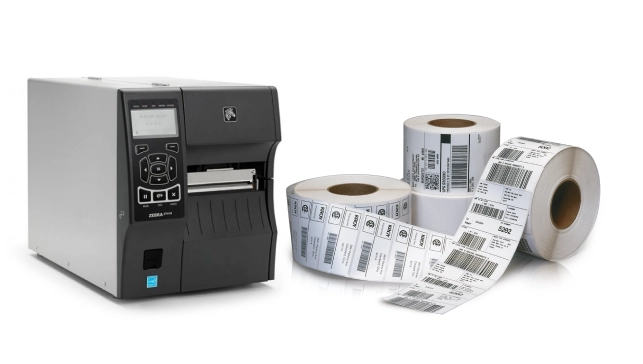
The barcodes produced, can also be used with our thermal printer labels. We stock thermal label rolls that are compatible with all of the leading printer manufacturers and models. Simply use the drop down menu to find the right printer and our tool will suggest a range of labels that are compatible.
Are you creating product labels that need a barcode or QR code? You can also use our custom label design tool to create free, professional looking labels for a wide range of products, such as jams, honey, candles and cosmetics. Find blank and pre-designed templates to help you get started.
The AA Labels App generates barcodes and QR Codes for free from text, URLs, phone numbers, SMS messages, or contacts (vCard). Whichever type of code you require, select the format, enter the relevant information to generate the barcode or QR code, then download and save. Apply to your labels or create/request a quote for printed barcode labels.
Once you have generated your free barcode or QR code, you can use it in a variety of ways. Simply download your code to get started.
As experts in custom printed barcode labels, we can professionally print your barcodes on sheet or roll labels, depending on your need. Your printed barcode labels can be supplied on a wide range of materials, from paper labels to numerous Polymers, in a variety of colours, textures and with a choice of adhesive, to suit your application.
Alternatively, order blank A5, A4 or A3 sheets to print your custom barcode labels at home or in the office.
The barcodes produced, can also be used with our thermal printer labels. We stock thermal label rolls that are compatible with all of the leading printer manufacturers and models. Simply use the drop down menu to find the right printer and our tool will suggest a range of labels that are compatible.
Are you creating product labels that need a barcode or QR code? You can also use our custom label design tool to create free, professional looking labels for a wide range of products, such as jams, honey, candles and cosmetics. Find blank and pre-designed templates to help you get started.
The AA Labels App generates barcodes and QR Codes for free from text, URLs, phone numbers, SMS messages, or contacts (vCard). Whichever type of code you require, select the format, enter the relevant information to generate the barcode or QR code, then download and save. Apply to your labels or create/request a quote for printed barcode labels.
Please Note:
The barcodes that you create are free, but not unique and intended for applications with limited use. If used in FMCG and/or retail market applications there is a potential risk of unintended duplication, copyright and trademark violation. Therefore, we shall not be liable for any loss, damage, cost, expense or liability of any kind including, without limitation, any loss of profits or indirect, consequential, incidental, special exemplary or punitive loss or damage, howsoever caused, suffered or incurred by you arising from or in connection with:
A barcode is the small image of lines (bars) and spaces that is affixed to retail store items, identification cards, and postal mail to identify a particular product number, person, or location. The code uses a sequence of vertical bars and spaces to represent numbers and other symbols. A bar code symbol typically consists of five parts: a quiet zone, a start character, data characters (including an optional check character), a stop character, and another quiet zone.
| Barcode Standard | Uses |
|---|---|
| Uniform Product Code (UPC) | Universal product code seen on almost all retail products in the USA and Canada. |
| UPC-E | Compressed version of UPC code for use on small products. |
| European Article Number (EAN-13) | European Article Numbering international retail product code. |
| EAN-8 | Compressed version of EAN code for use on small products. |
| Code 39 | The standard for many government barcode specifications. Also known as USD-3 and 3 of 9. |
| Code 128 | Very capable code with excellent density and reliability. Often selected over Code 39 because of its density and larger selection of characters. |
| PostNet | The PostNet barcode is used by the United States Postal Service to automatically sort mail. |
| Interleaved 2 of 5 | Widely used in warehouse and industrial applications. The data must consist of an even number of digits. |
| EAN-2 | The EAN-2 is a supplement to the EAN-13 and UPC-A barcodes. It is often used on magazines and periodicals to indicate an issue number. |
| Identcode | This code is mainly used by the Deutsche Post AG (DHL). The encoding pattern of this code is Interleaved 2 of 5, but with a different check digit |
| ITF-14 | ITF-14 symbols are generally used on packaging levels of a product. The ITF-14 will always encode 14 digits |
| Postal Alpha Numeric Encoding Technique | The Postal Alpha Numeric Encoding Technique (PLANET) barcode was used by the US Postal Service to identify and track pieces of mail during delivery. |
| Royal Mail 4-State Customer Code | RM4SCC (Royal Mail 4-State Customer Code) is the name of the barcode symbology used by the Royal Mail for its Cleanmail service. |
A QR code is a two-dimensional barcode that is readable by smartphones. It allows to encode over 4000 Characters in a two dimensional barcode. QR codes may be used to display text to the user, to open a URL, save a contact to the address book or to compose text messages. To read QR codes with your smartphone, you need an appropriate software installed on your phone. For Android-based devices, you can use Barcode Scanner for example. Just search for it in the market. On iOS-Devices like iPhones, there are also QR Code readers available on the AppStore, for Example i-nigma. On Symbian devices, you can use Mobiletag barcodes reader for example.
Our new online one page quick order process is designed in easy steps to help you place your order quickly and correctly, you can find 1000's of shapes and sizes, over 50 materials, printed or plain.
Search by your printer model for products that are compatible with your printer.
When you visit any website, it may store or retrieve information on your browser, mostly in the form of cookies. This information might be about you, your preferences or your device and is mostly used to make the site work as you expect it to. The information does not usually directly identify you, but it can give you a more personalize web experience. Because we respect your right to privacy, you can choose not to allow some types of cookies. Click on the different category headings to find out more and change our default settings
However, blocking some types of cookies may impact your experience of the site and the services, we are able to offer.
Cookie PolicyPlease note that nothing in these terms will apply to exclude or limit your rights, where they apply, under the Consumer Contracts (Information, Cancellation and Additional Charges) Regulations 2013 which set out certain rights, including a right to cancel certain Orders within 14 days.
These Regulations, and this section of our terms, only apply where you are purchasing as a consumer, and not where you are purchasing in connection with any business, trade or profession.
To exercise your right to cancel, you must notify us of this within 14 days after the day on which you receive the goods or the last instalment of them (if sent by multiple deliveries).
You can cancel by email: customercare@aalabels.com or telephone 01733 588390, or by post to AA Labels, 23 Wainman Road, Peterborough, Cambridgeshire, PE2 7BU, United Kingdom. You may use the model cancellation form here, but it is not obligatory. Please ensure that any notice clearly confirms that you are exercising this right and confirms your name, address, the details of the order (such as the order number and date of order) and contact details for you.
If you do exercise this right, you need to return the goods to us at your cost within 14 days of the date of the cancellation notice. We will then reimburse to you (by the same method used to pay for the goods) the price of the goods to which cancellation notice relates. This includes any standard delivery charges that we made when sending the goods to you in the first place, but not the costs of any more expensive method of delivery that you may have asked for.
Until the goods are returned to us you must keep possession of them and take reasonable care of them. Please note that we can deduct from any reimbursement the loss in value of any goods if you do not return them within the 14 day return period or if they have been lost or damaged as a result of you not taking reasonable care of them.
Your right to return goods does not apply to orders for goods made or modified to your specification or which you or anyone else authorised by you has used. Please note that our supply of labels to your order, such as your choice of shape, sizing, pattern or materials, is a supply of goods to your specification as these items are made specifically on your request and are not supplied from existing stock. Accordingly you do not have the right to cancel under the Regulations.
We have sent a 6 digit verification code to your email. Please enter the code below to proceed.
An Activation Email has been sent to your email address. Please follow the instructions in this email to continue.If you have not received this email please call us on 01733 588 390, Please also check your Junk Mail folder.
We have not find your email address in our record. Please check your email spelling if not then kindly register with us.
An Activation Email has been sent to your email address. Please follow the instructions in this email to continue.If you have not received this email please call us on 01733 588 390, Please also check your Junk Mail folder.
A link has been sent to your email address. Please follow the instructions in this email to continue.If you have not received this email please call us on 01733 588 390, Please also check your Junk Mail folder.
You are changing your previous printer mode selection and the printer model you have selected is compatible with both Direct Thermal (ribbon not required) and Thermal Transfer (ribbon required) printing modes.
Direct Thermal (Ribbon not required)
Thermal Transfer (Ribbon required)
We take pride in our service standards for all customer enquiries and orders. Our reputation for service is built on quality, a comprehensive product range and fast order fulfilment times, along with the combined experience and knowledge of our customer care team. If you need assistance or help regarding the most suitable choice of label, packaging, or promotional item for your application, please contact our customer care team, via the live-chat facility on the page, our website contact form, telephone, or email and they will be happy to discuss your requirements.
Check your email and enter the promotion code below to verify it. Change Email
Promotion code verified.
You previously viewed the labels shown, would you like to reopen this search, or start a new one?
Product Code:
Material:
Colour:
Adhesive:
Digital Process:
Quantity:
Finish: N/A
Core size:
Wound Option:
Orientation: